

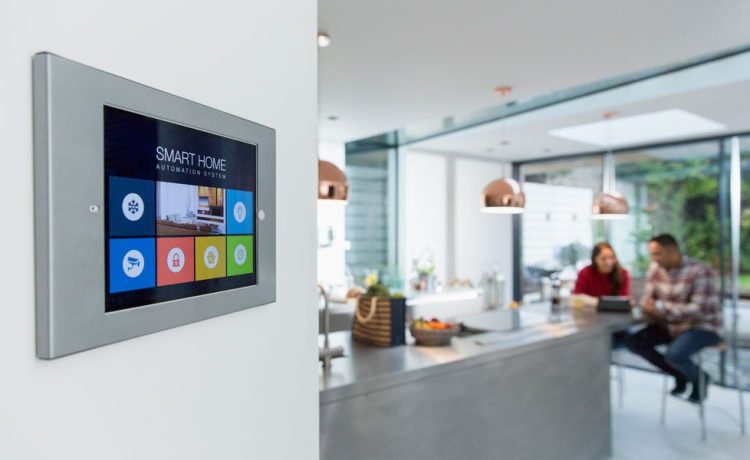
The early wave of consumer smart home adoption suffered from a glaring user experience problem: the proliferation of mobile application silos. Homeowners who invested in connected devices quickly found themselves juggling a dozen distinct smartphone apps—one to unlock the front door, another to adjust the irrigation schedule, and separate proprietary portals for audio zones, motorized shades, and ambient lighting. When early unified dashboards finally arrived, they made the mistake of treating a residential living space like an enterprise software monitoring suite. A house is not a server rack, and family members are not system administrators looking to parse telemetric graphs just to illuminate a hallway.
Designing an effective interface for home automation requires navigating a distinct human-computer interaction challenge: the interface is physically embedded in the environment it governs. Successful smart home user experiences demand zero-learning-curve usability, immediate tactile feedback, and nuanced multi-user ergonomics, all while imposing minimal cognitive strain on the people living with them.
The Latency Budget and the Universal Switch Standard
In web applications and mobile software, a four-hundred-millisecond delay accompanied by an animated loading skeleton is considered completely acceptable. In physical residential architecture, that same micro-delay feels broken.
When an occupant taps a wall-mounted panel or toggles a digital surface, they unconsciously measure that interaction against the gold standard of domestic hardware: the mechanical light switch. A traditional toggle switch offers instantaneous state change, rich tactile feedback, and total spatial permanence. If a digital interface introduces an eight-hundred-millisecond lag while waiting for an external cloud server round-trip, users instinctively tap the screen a second time, assume the system has frozen, or abandon the interface altogether.
Interface designers must enforce a strict sub-one-hundred-millisecond latency budget for local interactions. Achieving this standard requires prioritizing local-first communication protocols, such as Matter, Thread, and local hub networks, over cloud-dependent API calls. Visual components must deliver immediate optimistic state updates on touch, confirming user intent locally while handling network synchronization quietly in the background.
Structuring Information Around Spatial Intent Rather Than Devices
A pervasive flaw in smart home interface design is organizing controls by hardware category. Presenting an occupant with a raw vertical list of every dimmable bulb or motorized actuator in the house forces them to memorize technical device names and navigate excessive visual clutter. High-utility interfaces discard device-centric layouts in favor of spatial hierarchies and contextual human intent.
Room-Level Abstraction and Progressive Disclosure
Interfaces function best when they group controls around how people physically navigate a dwelling. At the top level, users should encounter high-level environmental summaries: current climate performance, perimeter security status, and primary lighting scenes for the room they are currently standing in.
Progressive disclosure is essential to maintaining visual calm. Detailed secondary adjustments—such as fine color-temperature sliders, fan speed step controls, or timer offsets—should remain neatly tucked beneath an intentional secondary tap. Establishing disciplined visual density ensures that an occupant wanting to dim the overhead lights before a movie does not have to scan past twenty dormant technical toggles to do so.
Context-Aware and Predictive State Surfacing
A home is a fluid environment whose operational needs shift throughout the day. Static interfaces that display the exact same grid of buttons at midnight as they do at noon waste valuable screen real estate and demand unnecessary scanning effort.
Contextual interfaces surface controls dynamically based on time, sunlight levels, and occupancy patterns. A well-designed morning screen prioritizes motorized blind controls, localized climate overrides, and morning routine triggers. As darkness falls, the dashboard shifts to highlight media distribution, evening mood scenes, and security arming controls. Furthermore, when an anomaly occurs—such as an unexpected moisture alert beneath a dishwasher or an open exterior gate—the interface should temporarily promote that critical alert above routine environmental controls.
Multi-Modal Harmony: Balancing Touch, Voice, and Physical Hardware
While touchscreens provide flexible software canvasses, they are frequently the least convenient way to interact with a space when carrying groceries, holding a child, or walking through a darkened room. A mature automation interface treats touch as only one part of an interconnected multi-modal system.
Preserving Tactile Affordances
Glass panels impose a visual tax. They force a user to stop moving, look directly at the screen, interpret a digital layout, and aim a finger at a flat coordinate. For this reason, smart home digital interfaces must live in close harmony with physical tactile controls.
Rotary dials with programmatic haptic resistance, tactile micro-switches, and customizable pushbuttons allow residents to modulate volume, lighting brightness, or blind positions entirely through muscle memory without looking. The digital interface should serve as an exploratory or status-monitoring surface, leaving routine, high-frequency micro-adjustments to well-placed tactile hardware.
The Guest and Multi-Tenant Usability Test
Every smart home interface must pass what usability experts call the guest test. Babysitters, visiting relatives, house cleaners, and short-term guests must be able to operate lighting, adjust temperatures, and use media centers without downloading custom software or receiving a technical walkthrough.
Accommodating unfamiliar users requires adhering strictly to universal physical metaphors. When a wall tablet rests in ambient mode, its resting screen should present clean, self-evident targets marked with standard iconography for lights, shades, and climate. Complex automation rules, logic builders, and network diagnostic menus should be protected behind secondary administrative tiers so guests can never inadvertently break an established automation loop.
Resilient Feedback and Fail-Safe Visual Systems
When enterprise web software loses internet connectivity, displaying an error page is an ordinary inconvenience. When a smart home interface loses its upstream link, an ungraceful crash can leave residents unable to illuminate a dark room or silence a false alarm. Designers must treat visual and functional resilience as non-negotiable requirements.
Interfaces must clearly signal communication states without creating alarm. If an external cloud bridge goes offline while local hardware controls remain operational, the interface should communicate that degraded status via quiet status tags rather than locking down the screen with invasive modal warnings. Locally addressable peripherals must remain responsive. Additionally, the interface should adapt its visual styling to the ambient light in the room, utilizing deep contrast dark themes during late hours to avoid blinding occupants, and shifting to high-luminance, anti-reflective layouts during peak daylight.
Transitioning from Constant Control to Ambient Autonomy
The ultimate objective of smart home interface development is not to tether residents to interactive screens; it is to make direct manual control rare. A home that requires constant manual tapping on digital panels is not automated—it is merely remote-controlled.
As spatial presence detection and predictive machine learning models mature, the primary role of the interface shifts from active operation to quiet oversight. The screen becomes a place to review automation logic, verify system health, and fine-tune behavioral boundaries. By honoring physical spatial habits, eliminating latency, and respecting the human need for quiet, clutter-free spaces, smart home interfaces can finally move beyond novelty and become natural extensions of the built environment.